Work

What I've built so far.

Explore products, websites and prototypes I have designed and built. Each project is clearly labelled as a product, demo, prototype or permitted work in progress.

Tell me what you want to improve

5 projects Real screensOnly public links are shown

Selected work

See the screen. Understand the build.

Each project pairs the visible design with its purpose, key decisions, current stage and a practical build map.

Showing 5 of 5 projects

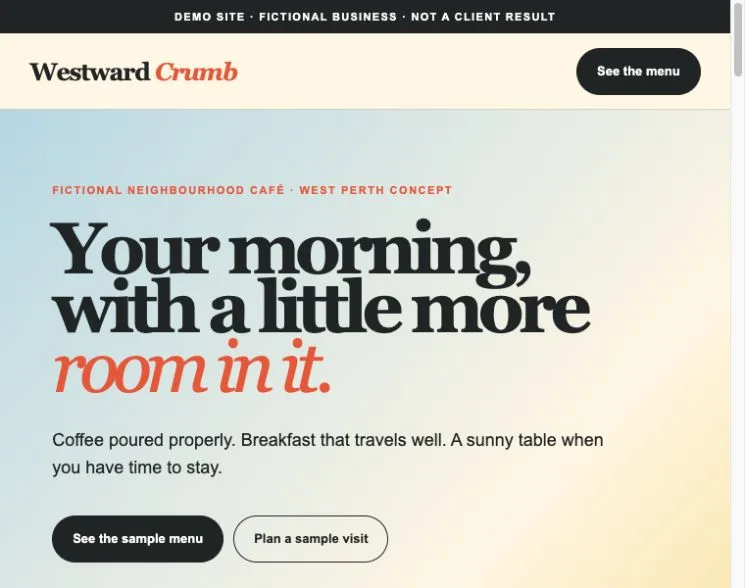
Westward Crumb fictional café demo with a sample menu and illustrated coffee settingFictional café demo using sample business content.
Website demoDEMO SITE

Westward Crumb Café

A complete fictional café website showing how a nearby customer could move from the first screen to a sample menu and practical visit information.

Who it's for

A neighbourhood café that needs customers to see the menu, hours, location details and next step quickly on a phone.

Why I built it

I built this demo to show a finished page flow instead of asking a buyer to imagine one from a generic mockup card.

The business, menu, prices, hours and location are invented. A real build would replace them with owner-approved facts and photography.

Three decisions that shaped it

  1. Answer menu and visit questions before telling a long brand story.
  2. Use separate Morning, Midday and Take home views instead of one crowded menu.
  3. Keep the fictional-business label visible in both the header and footer.

What exists in the build

  • A responsive fictional café homepage
  • A keyboard-operable sample menu switcher
  • Visit, access and business-fact placeholders
  • Reduced-motion and phone layouts

Current stage

  • Complete one-page website demonstration with an interactive sample menu
  • Ordering, booking and payment are outside this demo's scope
  • A real café build would use the owner's approved menu, hours, location and photography

Next step

Replace the fictional content with a real café's approved menu, hours, imagery and tested customer action.

If you wanted something like this, it would need:

  1. 01Approved menu
  2. 02Opening hours
  3. 03Owned photography
  4. 04Location and access
  5. 05Customer action
  6. 06Launch testing
Lead Reactivation product page with a clearly labelled example text conversationExample product screen using a fictional conversation.
OperationsOUR PRODUCT · PILOT

Lead Reactivation

My own product for following up a business's old enquiries by text. The owner reviews the list and campaign plan first, and a booking counts only when it reaches the calendar.

Who it's for

A business with its own dormant enquiry list, usable consent and suppression records, and someone who can approve the campaign and handle replies.

Why I built it

A message saying yes is not the same as a booked job. I built this around stricter checkpoints: who may be contacted, what may be sent and whether a matching booking reached the calendar.

The first pilot is still to come. It will be founder supervised, with the list, campaign plan and first send reviewed before anything moves.

Three decisions that shaped it

  1. The list comes in as a CSV. I do not claim a direct connection to a named CRM.
  2. The business owner reviews the eligible audience and approves the campaign plan before anything is sent.
  3. A booking counts only after Cal.com holds a matching record, not because a message says yes.

What exists in the build

  • A public product page with a clearly labelled fictional conversation
  • A CSV review and import path with suppression checks
  • Approval controls for the audience and campaign plan
  • Calendar-match rules and an operating record

Current stage

  • The first pilot has not started; provider sending stays off until the list, consent records and campaign plan are approved
  • The pilot uses a CSV import rather than claiming a direct connection to every CRM

Next step

Complete one approved, founder-supervised pilot and publish only results the client permits and the records support.

If you wanted something like this, it would need:

  1. 01Past enquiries
  2. 02Contact checks
  3. 03Owner approval
  4. 04Conversation
  5. 05Calendar check
  6. 06Activity record
Stackd Burgers work-in-progress homepage with contact and location details redactedOwner-permitted work in progress. Contact and location details are redacted.
CommerceWORK IN PROGRESS

Stackd Burgers

A restaurant website in progress for a burger bar in Pune, India, shown with the owner's permission. One signature burger leads the front page, and the same look carries into the menu, cart, rewards and past-order pages.

Who it's for

A restaurant that wants the food, ordering journey and repeat-customer features to feel like one recognisable brand.

Why I built it

I built the front page around the product people should remember, then carried the same visual language into the practical pages a restaurant needs.

The design system and main customer journey are in place. Ordering and account paths are the next build stage.

Three decisions that shaped it

  1. Give one signature burger the hero instead of opening with a generic menu grid.
  2. Explain the burger layer by layer so the main product carries the story.
  3. Use the same type, colour and illustration system across browsing, ordering and rewards.

What exists in the build

  • The public-facing navigation and home page
  • A product-led visual and copy system
  • Menu catalogue and cart interfaces
  • Pages for rewards, offers, catering and past-order lookup

Current stage

  • Work in progress with the main brand, menu and cart interfaces built
  • Checkout, delivery, rewards and account journeys are still being completed
  • Menu, prices, hours and delivery area need the owner's approval before launch

Next step

Finish the transaction and account paths, then run owner review and end-to-end ordering tests before launch.

If you wanted something like this, it would need:

  1. 01Brand and menu
  2. 02Product catalogue
  3. 03Cart
  4. 04Checkout
  5. 05Kitchen handoff
  6. 06Order support

Important: Prototype only. Not financial, accounting, legal, employment or governance advice. Formulas and controls are not independently verified.

Velocity OS prototype dashboard showing sample and empty-state company informationPrototype. My own product. Sample data.
OperationsPROTOTYPE

Velocity OS

A prototype workspace for a small company's board papers, decisions, finances and KPIs, brought into one navigation.

Who it's for

A small company that wants its board material, operating decisions, finance scenarios and KPI definitions in one place.

Why I built it

I built it to explore whether strategy, governance and day-to-day operating work could share one clear home instead of living in separate documents.

The screen uses sample and empty-state data. It shows the shape of the product, not a live company or a verified financial model.

Three decisions that shaped it

  1. Use clear empty states instead of invented live company activity.
  2. Keep finance inputs visible beside their outputs so assumptions can be challenged.
  3. Write targets, warning bands and escalation notes into the KPI view instead of hiding them in a separate manual.

What exists in the build

  • Navigation across boardroom, workspace, governance, finance, compensation and operations
  • Dashboard, calendar, task and activity empty states
  • A finance-scenario interface
  • KPI definition and escalation screens

Current stage

  • Prototype using sample and empty-state information
  • Independent formula and permission review comes before real organisation use
  • Organisation roles, history and connected data are later build stages

Next step

Have the formulas and permission model independently checked before any real organisation uses it.

If you wanted something like this, it would need:

  1. 01Board material
  2. 02Decision register
  3. 03Finance scenarios
  4. 04KPI rules
  5. 05Roles and actions
  6. 06Review history

Important: Prototype only. Not financial, credit, tax or legal advice. Not a quote, eligibility result or verified calculator.

FirstHome Navigator prototype showing a fictional property and repayment scenarioWorked example with sample figures. Not a verified calculator.
Decision supportPROTOTYPE

FirstHome Navigator

A prototype that helps a first-home buyer in WA see one worked scenario: purchase price, deposit, loan and repayments, with each figure showing its source and date.

Who it's for

A first-home buyer in WA who wants one worked scenario with its assumptions and sources visible beside it.

Why I built it

I built it to put the moving parts of a first-home decision on one screen, with sources and dates next to the figures instead of hidden in notes.

It is a way to explore decision design. The maths and eligibility rules still need independent review before anyone could rely on them.

Three decisions that shaped it

  1. Show assumptions beside the result instead of hiding them behind one final number.
  2. Put the source and date inside the screen so the buyer can see when a figure may be stale.
  3. Place the advice warning before the screenshot, not in fine print after it.

What exists in the build

  • A worked property-scenario summary
  • Visible purchase, deposit and loan assumptions
  • Repayment and comparison screens
  • Source and date labels inside the interface

Current stage

  • Worked-example prototype using sample figures
  • Independent maths, source and eligibility review comes before public calculator use
  • Accounts, privacy and security are later build stages

Next step

Have the maths, sources and eligibility rules independently checked before any public calculator or advice-like use.

If you wanted something like this, it would need:

  1. 01Scenario inputs
  2. 02Assumptions
  3. 03Worked output
  4. 04Sources and dates
  5. 05Human verification

What each project includes

Useful context, not just a screenshot.

  1. 01

    A real screenshot with private details removed.

  2. 02

    A clear label: product, demo, prototype or work in progress.

  3. 03

    The decisions that shaped the design and workflow.

  4. 04

    A practical map for adapting the idea to another business.